
Finance
Newsletter
Previous Editions
This is only the second edition of our newsletter in this new web-based format.
There’s still time to let us know what you think. This is one of WV Finance’s primary communication tools, so we want it to work well for you.
Also, we’re still adding features. See the “Finance Department News” section for more information.
The transition to WV’s new Consolidated Salary budget model is complete!
This was a huge change for WorldVenture, both in terms of philosophy and procedures. Make sure you read the article below entitled “Spouse Compensation Update.”
Speaking of the new budgets…
Some of you indicated a change to your Envoy contributions on your worksheets, but neglected to make that change effective by indicating the same to Envoy.
Remember—and this is even more true under the new budget model—that changes to your voluntary retirement contributions can only be done through Envoy. We cannot change it for you, and under the new budget model we cannot even check to see what amount you intended it to be. Please remember to communicate with Envoy regarding how much you want deducted from your paycheck and put into your retirement savings account.
This newsletter is also published on the GMC for future reference. We know that you have much going on and that keeping up with what is happening in Finance may be another item on a never-ending task list. Thank you in advance for taking some time to read these announcements and for the important work that you do every day. Our hope with sending you this information is not that you become an expert in WV financial matters, but that you are informed of changes that impact you directly, and that you know where to turn if you need help. It is our pleasure to serve alongside you!

As mentioned in the Quick Notes, we’ve added a couple new features to this online newsletter.
We were able to implement the additional features we promised in our last newsletter, specifically…
If this is your first time navigating this web-based newsletter, here are some features that we hope you’ll find useful:
If you have any feedback about this format, please let us know. We want to know about any ideas you have that could make this tool more useful to you; email us at FinanceHelp@worldventure.com.
Soraya Marin – VP/Chief Operations Officer
Luke Oravec –Treasurer
Fabian Perea – Assistant Treasurer
Christina Segura – Senior Staff Accountant, Europe/MENA & Americas
Dan Penney – Staff Accountant, Africa & Asia
Kriss Reese – Financial Services Manager
Madeline Shanley – Receipting Manager
Mary Ackermann – Donor Receipting Specialist
Becky Binuya – Receipting Staff
Ryan Volz – Accounts Payable Manager
Renee Chase – Accounts Payable Staff
Announcement of an Increase in the IRS Mileage Rate (from Ryan Volz, February 29, 2024)
This communication is to inform that the IRS increased the optional standard mileage rate for 2024 by 1.5 cents per mile; from 65.5 to 67 cents per mile. WorldVenture uses the rate provided by the IRS to calculate the reimbursable amount for ministry miles driven in a personal vehicle. This increase in the Mileage Rate was effective as of January 1, 2024. Please be sure to use the updated forms and instructions below as this change will impact the amount you are eligible to receive for miles driven.
Please Note: For personal miles driven in a ministry vehicle, this rate will be used for these calculations as well. These are usually recorded on the Quarterly Work Funds Report in the ‘Income’ column or as a Credit to your USF in the WV Expense Report. (Editor’s note: for a comprehensive explanation of how to manage vehicle finances in general, refer to the previous edition of this newsetter, January-April 2024).
Please email the Finance Team at FinanceHelp@worldventure.com, using the word “Reimbursements”, with any questions related to this topic.
Dear colleagues,
We have many reasons to give thanks to God!
The Global Worker Compensation Implementation Team (GWCIT) is happy to announce that we have completed the onboarding process for the new consolidated budgets for all Global Workers! This process has resulted in 44 Global Workers who were not being paid but have elected to receive compensation for the important Kingdom work that they are doing. That’s 44 new WV employees!
The GWCIT has met pretty much every week since the spring of 2022! And there were lots of smaller committee meetings along the way. This team is an amazing example of several departments working together to achieve a common goal and implement an important change in our organization.
What has been accomplished?
We have often sought the Lord during these last years and are thankful for those of you who have prayed for perseverance and wisdom, and have given input along the way. We appreciate each of you!
There is still work to be done. For instance, some of the recommendations given by the Spousal Task Force back in the fall of 2020 have yet to be implemented. But for now, we want to pause and give God the glory for helping us to this point. Will you join us in doing that?
Together with you,
The Global Worker Compensation Implementation Team
P.S. Additional note about Special Project reports: As part of the onboarding process, we want all Global Workers to be able to see their Special Project statements on the GMC portal. Many spouses did not have access to their own portal prior to the last few months, but now they do. However, it has been brought to our attention that in some cases, not all special projects can be seen by both spouses. If you have Special Projects whose statements you cannot view through your own GMC access, please send an email to FinanceHelp@worldventure.com and let Finance know which special projects you need to see on your GMC portal. Put the keywords “special projects on the GMC portal” in the subject line of your email.
Our next regular Open Enrollment is coming, in June! (I know, I know. You’ve had it up to here with budgets but hear me out, there’s some valuable information here.)
We skipped the last normally scheduled Open Enrollment back in December because all Global Workers would be onboarded to the new Consolidated Salary budgets during the first quarter of 2024. This was the final step in the years-long Global Worker Compensation Project. So this Open Enrollment will be the first under the new budget structure.
First of all, don’t panic thinking that you have to do something in June just because there’s an Open Enrollment. If your new budget—the one you’re operating under since you were onboarded to the new model—is working fine, you do not need to do anything. But since the opportunity is coming to make budget adjustments, and the budget model has changed, we wanted to remind you of a few key implications.
Remember that you no longer have multiple budget line items that make up your salary. No more “Salary – Medical”; no more “Retirement Voluntary”; no more “Children’s Education”; or “Household Help”; or “529 College Savings”; or “Student Debt Assistance”; etc. You now have only one line item for salary in your budget (well, aside from “Cost of Living Adjustment,” over which you have no control).
This means you need to take all those expenses into consideration as you determine what your salary needs will be for the second half of 2024. If you have educational costs for your children coming up, factor those into your salary level(s). If you are contributing to your Envoy retirement account as a deduction from your gross salary—and especially if you plan to adjust that contribution any time in the next six months—make sure that is included in your total salary needs. If you anticipate “extra” medical expenses, remember to take those into account as you set your salaries.
Of course, Housing Allowance is still a separate item in your budget, so don’t include that when estimating your “Consolidated salary” needs. And since we mentioned housing allowance, let us also remind you that you do not need to submit a new Housing Allowance form with this Open Enrollment, unless you need to change your housing allowance amount starting in July.
IMPORTANT: One big implication to this change in your salary structure is that your voluntary 403(b) contribution (Envoy) no longer shows on your budget. It is now 100% your responsibility to make sure that the amount you desire is being deducted from your salary and sent to Envoy each month. This is accomplished exclusively on the Envoy side of things. In other words, your Staff Accountant can no longer check to see if you are contributing the “correct” amount (i.e., the amount you want deducted and contributed). You must verify this with Envoy. And if you want it changed, that can only be done through Envoy, by you.
A final reminder: the Years of Service (YoS) adjustment is another salary category that went away with the new budgets. Since you can now control your overall salary amount, the Global Worker Compensation committee decided to dispense with the YoS line to further simplify the budgets, as well as to make them more flexible (some folks didn’t want to raise the extra support to cover the YoS amount). So now you are the one who is responsible to give yourself an annual raise for seniority (if you want it)!
A question we frequently get is, “What’s the mileage rate these days?”
And some of you are astute enough to ask where you can find it on your own so that you’re not dependent on Finance for the answer. Both good questions!
Answer to question #1: The current IRS-recommended mileage rate—which is what WorldVenture uses—is 67 cents/mile ($0.67). That’s the easy question; now for the slightly more involved one…
Answer to question #2: The best place to find the most up-to-date information on what mileage rate WorldVenture is using at any given moment is in the online Expense Report feature of the GMC.
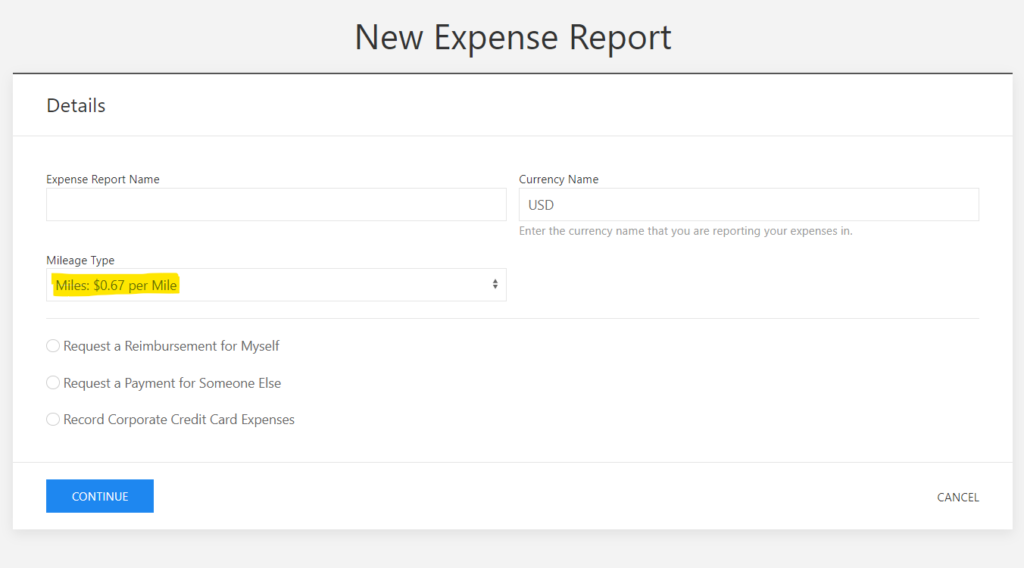
This is the quickest and most reliable way to find out what mileage rate WorldVenture is using corporately at any given time.
While we’re talking about the mileage rate, if you’re one of those faithful who turn in a Quarterly Work Funds Report (QWFR) every 3 months, you’ll need to update the mileage rate in your QWFR file for the first quarter of each year. We just explained how to find out what the mileage rate is. Here’s where and how to put that new rate into your QWFR.
Any time you need to update the mileage rate in your QWFR, open up the report and click on the “Dropdown box dynamic queries” tab at the far right of the bottom of the spreadsheet. Once on that tab, you will see a pair of columns at the far right (columns U and V). One has the heading “Year” and the other is “Mileage Rate”. Click on the cell under the Mileage Rate column that is opposite the year in question and enter the new mileage rate for the year. There! It’s that simple. Of course, remember to enter the number as a full dollar amount—as in, 0.670—not in cents, as in 67 (you don’t want to be paying $67.00 a mile for your personal mileage!).
Information contained in this newsletter is intended for internal use by WorldVenture workers, staff, approved volunteers, and board members. Unauthorized distribution to other parties is not permitted without permission from Finance leadership.