
Finance
Newsletter
Previous Editions
This is our first newsletter in this new web-based format!
Let us know what you think. What do you like? What would you change?
See the “Finance Department News” section below for more information, as well as tips on how to use some its new features.
The transition to WV’s new Consolidated Salary budgets has begun! — make sure you read the article in this newsletter entitled “Spouse Compensation Update.”
Reminder: WorldVenture’s hired vehicle insurance card is available to cover your car rentals. If you have downloaded this card in the past, make sure you have the current version. A new card for the current coverage period (Oct 20, 2023 – Oct 20, 2024) is available for dowload via the GMC’s Knowledge tab.
This newsletter is also published on the GMC for future reference. We know that you have much going on and that keeping up with what is happening in Finance may be another item on a never-ending task list. Thank you in advance for taking some time to read these announcements and for the important work that you do every day. Our hope with sending this to you is not that you become an expert in all WV financial matters, but that you are informed of changes that impact you directly, and that you know where to turn if you need help. It is our pleasure to serve alongside you!

As mentioned in the Quick Notes, this is our first edition of the completely new format for this quarterly newsletter. We hope you find it both easier to use and more readable.
We wanted to point out some new features that we hope you’ll find useful.
If you have any feedback about this format, please let us know. We want to know any ideas you have that could make this tool more useful to you; email us at FinanceHelp@worldventure.com.
Soraya Marin, VP/Chief Operations Officer
Luke Oravec, Treasurer
Fabian Perea, Assistant Treasurer,
Christina Segura, Senior Staff Accountant – Europe/MENA, Americas
Dan Penney, Staff Accountant – Africa, Asia
Madeline Shanley, Receipting Manager
Mary Ackermann – Donor Receipting Specialist
Becky Binuya, Receipting Staff
Open Position – Donor Receipting Specialist
Ryan Volz, Accounts Payable Manager
Renee Chase, Accounts Payable Staff
Announcement of Potentially Inaccurate GMC Report Balances in early January (from Fabian Perea, January 2, 2024)
Please note that we plan to close the accounting of December on Friday, January 12th to process year-end contributions that are still on their way to HQ.
This will result in your fund balances (ministry and personal funds) not calculating correctly on the GMC. We apologize for any confusion that this may cause presently, but please know that this is expected, and will be corrected once we have been able to close the December accounting period.
The Consolidated Salary transition (previously known as the Spouse Compensation Project) is now under way!
Everything you need to know is published on the GMC’s “GWC” tab (on the far left, right next to your “Profile” tab). Check back there frequently for updates and answers to any questions.
Note, too, the update article in this newsletter entitled “Spouse Compensation Update.”
*Republished from January-March 2023 Newsletter
The time to begin preparing tax returns is fast approaching.
We are pleased to announce that Lois Huston will again be providing tax preparation services for our Global Worker community this coming 2023 filing year. As a reminder, the cost of this service is covered by WorldVenture as part of your Tax Equalization fees and we highly encourage all of our eligible workers to connect with Lois and benefit from her service and expertise.
Lois will contact Global Workers with instructions so she can prepare your return(s). When you receive an email from Lois please remember that she is the CPA that WorldVenture contracts with for our worker’s tax returns! Your attention to those communications will help ensure a smooth and effective tax season for everyone.
We also want to remind you that we have information available on the GMC to assist you in understanding the process and some items that may be on your tax return especially if this is your first year with WorldVenture. Please look up the following documents to understand more about this service we offer:
Should you have questions about this coming tax season, please address your inquiries as follows:
New Year…. New Budget
Below you will find the onboarding schedule for the new Consolidated Salary Budget and the Global Worker Compensation Project. Please
remember that ALL WorldVenture Global Workers will transition to the Consolidated Salary Budget whether or not you are adding a second paid Global Worker.
The onboarding will be done in two groups:
Please note which group you are in and be sure to follow the schedule as outlined below. Global Workers in Africa and the Americas have already received a detailed email with instructions as to how to onboard to the new system. For the Workers in these regions, your Open Enrollment for submission of budgets is now open.
For Global Workers who do not currently have their own GMC access, you will receive instructions from Tyler Rogers (WorldVenture IT) to set that up. It is imperative that you activate your worldventure.com email address in order to secure your GMC access and receive important WorldVenture correspondence. If you need help, please write to helpdesk@worldventure.com.
We would like to remind you that all information about the Consolidated Salary Budget and the Compensation Project can be found on the GMC under the GWC tab at the top of the page. We encourage you to familiarize yourselves with the information there as soon as you can.
| GMC Access | Planning and Information- Gathering Phase | Consolidated Salary Budget Development/ Submission (adding a new paid GW if desired) | Approval and Onboarding via Finance and HR (Headquarters) | First Paycheck Reflecting New Budget |
Group A Americas & Africa | December 1–31 | December 1–31 | January 1–31 | February 1-20 | February 29 |
Group B Europe/MENA & Asia | January 1- February 15 | February 15- | March 1-31 | April 1-20 | April 30 |
The Implementation Team is available to help you through the process in any way we can. Please do not hesitate to email your questions to compensation@worldventure.com
Serving Together,
The Global Worker Compensation Project Implementation Team
When you use the same vehicle for personal use and ministry, it’s easy to get confused about the finances. For instance, if you use your own car for a ministry trip, shouldn’t your Work Funds pay for the gas for that trip? Many would say yes, because intuitively it feels like ministry funds should pay the expenses of a work trip in a personal vehicle. But the correct answer is no, you should not “bill” your Work Funds for the fuel used for ministry trips in a personal car. In fact, if you’re doing this, you’re getting ripped off!
Or what if you have an accident while driving your mission-owned car for personal use. Shouldn’t you pay for the repairs? Or at least the deductible? Again, the correct answer is no.
If either of these scenarios seems confusing to you, read on. Car finances are quite simple once you understand the underlying principle, which has two balancing components:
So according to point #1, if yours is a mission-owned car, your USF/Work Funds should be paying for every single expense related to that car. This includes the gas when you drive it for personal trips. It includes all the following as well: insurance, registration, licensing, maintenance, repairs, fuel, and anything else! You should be expensing all of these. (The only exception to this is if you incur any fines or tickets from traffic or parking violations. Those are on you no matter who owns the car.) This can be illustrated with the following diagram:
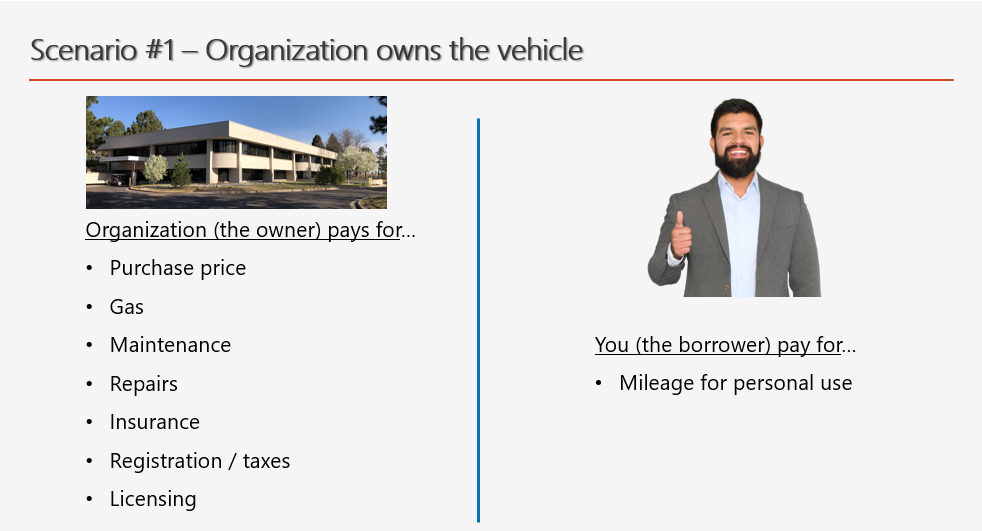
You, on the other hand, pay nothing out of your pocket for the car except for the mileage rate for any miles you put on the car for personal use. So when you “borrow” your mission car to take a personal trip—whether to the grocery store, to take your kids to school, or to go on a long vacation trip—you pay nothing except for the full mileage rate for the miles you drive for those trips.
And if the car belongs to you, it’s simply the reverse. In that case, you’re the owner and you pay for everything, including the gas when you use the car for work/ministry. But in this case, your Work Funds (or USF) then pays you mileage for any work-related driving that you do. So now the diagram looks like this:

Why Does This Work?
If it still feels strange not to pay for the gas when you “borrow” your mission car for a personal trip, let’s unpack the principle behind this. The IRS-established mileage rate has been calculated to cover all expenses of vehicle ownership over the lifetime of the vehicle. This estimated cost-of-ownership for a vehicle is then divided by the life expectancy of the vehicle in miles. What that means is, in theory at least, if you were to borrow a vehicle for 100% of its miles over the entire life of the vehicle, the mileage rate you would pay for all those miles should cover all expenses related to that vehicle, from the initial purchase price, to the insurance and maintenance, to the gas for each mile driven. So when you borrow your mission-owned vehicle—or “the company” borrows your personal vehicle—all the expenses for those miles are covered by paying the mileage for each borrowed mile. If the borrower pays only for the fuel used on a trip, they’re effectively cheating the owner because there are many more costs to running a vehicle for those miles than just the fuel for the trip.
Who’s the Owner?
You might have one last question: How do I know who owns the vehicle? After all, if I paid for it from my USF, since my supporters gave those funds for me, doesn’t the car belong to me? In short, no. The answer may make more sense when you recognize that the IRS defines all the money in your USF—that is, any funds donated to WorldVenture for your support—as tax-deductible “ministry funds” belonging to WorldVenture. The only personal funds that come out of your USF are your salary and housing allowance, which become personal only when WorldVenture defines them as salary and sends them your personal bank account. So if you paid for your vehicle with funds from your USF, that vehicle belongs to WorldVenture. A car belongs to you only if you paid for it in full from personal resources such as salary or personal savings. To restate it in the simplest terms, the “owner” in our two-point principle above is the one who paid the purchase price of the car.
As always, if you have any questions regarding any of this, do not hesitate to email us at FinanceHelp@worldventure.com.
If you drive a mission-owned vehicle, you are required to repay your Work Funds or USF for any personal use of the vehicle. The traditional way to do this is to transfer the appropriate amount of personal money into whatever account holds your Work Funds. If you have such an account, or if you are routinely submitting Quarterly Work Funds Reports, this is a simple transaction that can be done as part of your regular reporting on your use of ministry funds. (Note that payment for the personal use of a mission-owned car must be done based on actual miles driven—see the article immediately above in this newsletter titled “Car Finances Simplified.”)
But what if you don’t receive Work Funds? What if you do reimbursements only and so don’t submit Quarterly Work Funds Reports? Under those circumstances there is no account of Work Funds to repay, so how do you pay for personal mileage? Fortunately, there’s an easy way to do this.
You can just enter your personal mileage into a WV Expense Report as a negative number! As long as you have enough other expenses on the same expense report such that they add up to more than your personal mileage payment, this works well. Here’s how to do it…
Step 1: Create a separate expense line in your expense report to pay for your personal mileage and assign it a date. You may use any date within the period you’re reporting on, but make sure it is less than 90 days ago.
Step 2: Check the box on the form for “This is a mileage expense” (see image below). This will automatically bring up the Expense Type “WV-7320-Mileage: Personal Vehicle” in the Expense Type field immediately below. Note that this is not technically accurate, since you are not getting reimbursed for ministry miles on a personal vehicle. Instead, you’re paying for personal miles on a mission vehicle. Nonetheless, leave that Expense Type as it is; it’s the most appropriate one we currently have for this purpose.
Step 3: You may leave the Vendor field blank, or you can put your own name there if you prefer. In the description field, enter a brief sentence indicating that you are repaying your USF for personal miles on a mission vehicle.
Step 4: When you come to “Distance Traveled (Miles)”, enter the number of personal miles driven as a negative number. Since the Expense Report automatically calculates the dollar amount based on the number of miles, this will cause the “Amount” field to be a negative number as well (note this in the example image below).

The effect of all this is to reduce your total reimbursement from the expense report, effectively allowing you to “pay back” your USF for the personal miles driven on your mission-owned car. As long as the overall total on the expense report is positive—that is, if your other expenses add up to more than the negative dollar amount for the repayment of personal miles—the system will allow you to submit the report. The reimbursement you receive from this expense report will be the total of all your positive expenses minus the dollar amount for your personal mileage.
Information contained in this newsletter is intended for internal use by WorldVenture workers, staff, approved volunteers, and board members. Unauthorized distribution to other parties is not permitted without permission from Finance leadership.